
How to Support Struggling Writers in the Classroom (with Clicker)
Some students have great ideas but struggle to get them onto the page. Spelling, handwriting, planning and reading all get in the way. This guide covers practical ways teachers and families can support struggling writers, and where literacy software like Clicker fits in.
Why some students struggle to write
- Spelling and decoding: students avoid words they can’t spell, so their writing shrinks.
- Handwriting or motor difficulties: the physical act of writing uses up energy meant for ideas.
- Planning and organisation: knowing where to start, and what comes next.
- Confidence: repeated failure makes writing feel like a test they can’t pass.
Seven strategies that help
- Talk before writing. Let students say their ideas out loud first, then record or write them.
- Give word banks. Topic vocabulary on the desk or screen removes the spelling barrier.
- Use sentence starters and frames. Scaffolds help students build complete sentences.
- Hear it back. Listening to their own writing read aloud helps students spot and fix mistakes.
- Use pictures. Symbols and images support early and emerging readers.
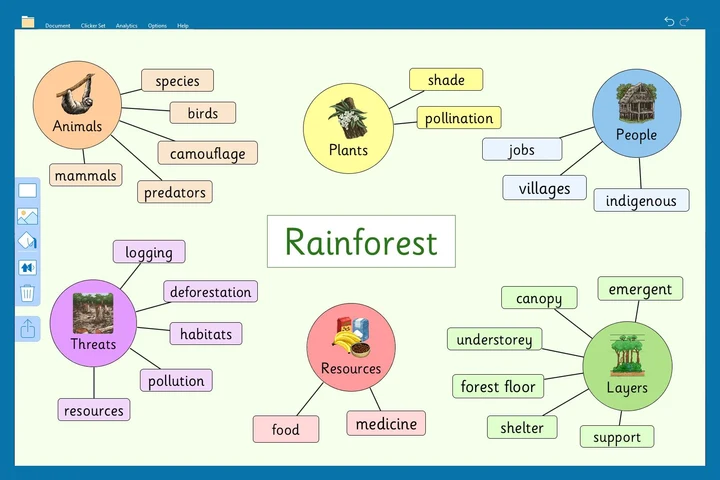
- Plan visually. Mind maps and graphic organisers turn ideas into a structure.
- Offer different ways to respond. Typing, word grids or switch access for students who can’t hold a pencil.
How Clicker supports struggling writers
Clicker is a child-friendly literacy tool used in classrooms across Australia. It brings many of the strategies above into one program:
- Speech feedback reads words and sentences back as students write.
- Word prediction suggests the next word, reducing spelling stress.
- Clicker Sets give clickable word and sentence grids for any topic.
- Pictures and symbols support emerging readers and students who use AAC.
- Voice notes and mind mapping help students capture and plan ideas.
- Access options include switch and eye gaze for students with physical disability.
Because every student uses the same program with different supports, it works for whole classes, not just students with a diagnosis.
Clicker for schools and individuals
NovitaTech supplies Clicker in Australia, including whole-school OneSchool licences and one-to-one licences for home or NDIS use. See Clicker pricing for schools, or ask us for a quote or demo.
Frequently asked questions
Is Clicker only for students with a disability?
No. Clicker is designed for all students learning to read and write, with extra supports for students who need them.
What ages is Clicker for?
Clicker is mainly used in primary school, and also with older students who need literacy support.
Can Clicker be funded through the NDIS?
Literacy and communication software may be funded through an NDIS plan when it relates to the participant’s goals. Talk to your therapist or plan manager, and contact us for a quote.
Can we try Clicker before buying?
Yes. Ask us for a demo and we can talk through options for your school or family.
Help every student write
Clicker literacy software
Whole-school and one-to-one Clicker licences, with demos and advice from NovitaTech.
Ask about Clicker